

Download 8085 Simulator – Free Educational Microprocessor Programming Tool
Overview
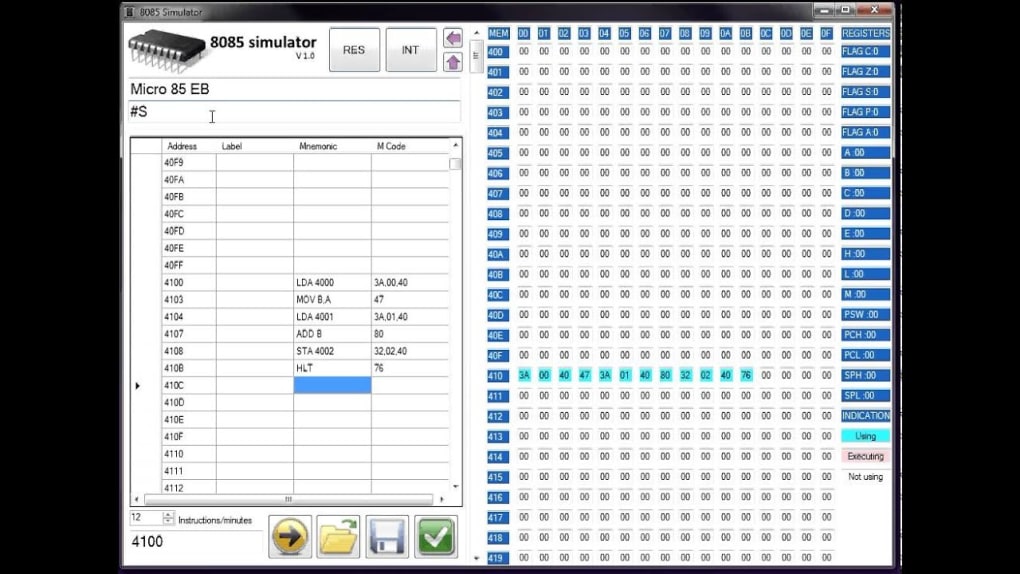
The 8085 Simulator by J‑Tech Softwares is a free, Windows‑based scientific simulation program that lets students and hobbyists practice Intel 8085 microprocessor programming without the need for costly hardware kits. Developed by Jithin Jose, the simulator reproduces the execution of 8085 op‑codes in a clear graphical environment, offering both a Simple mode for quick tests and an Advanced mode for full‑scale assembly language development. While the tool assumes a baseline understanding of the 8085 architecture, instruction set, and addressing modes, it removes the risk of damaging a physical processor and eliminates the expense of trainer boards.
The program was built with Microsoft Visual Studio 2010, resulting in a lightweight executable that runs smoothly on modern Windows PCs. Its primary audience is engineering students, educators, and anyone needing a reliable, zero‑cost platform to experiment with 8‑bit microprocessor concepts. Because it is free and open for unlimited use, the 8085 Simulator has become a popular supplement to traditional lab kits, especially in institutions that favor software‑only solutions for introductory computer architecture courses.
Key Features
- Dual‑Mode Operation: Simple mode offers pre‑written instruction sets with INT/RES controls for quick demonstrations, while Advanced mode lets users write custom assembly, adjust execution speed, and step through each opcode.
- Graphical Register & Memory View: Real‑time display of accumulator, flags, program counter, stack pointer, and full memory map keeps learners aware of state changes after every instruction.
- Label Support & Mnemonic Entry: Users can assign symbolic labels to memory locations, making code more readable and mirroring real‑world assembly development practices.
- Instruction Table: A neatly organized table lists all 8085 op‑codes with corresponding hex values, addressing modes, and brief descriptions, acting as an on‑screen reference.
- Speed Control Slider: Adjust execution speed from single‑step to full‑run, allowing detailed debugging or rapid program verification.
- Interrupt Simulation: INT and RES buttons emulate hardware interrupt handling, giving a practical feel for asynchronous events.
- Export & Import: Save assembled programs to .txt files and reload them later, facilitating project continuity across multiple sessions.
- Lightweight & Free: The installer is under 5 MB, installs quickly, and carries no licensing fees, making it ideal for budget‑conscious educational environments.
Installation & Usage Guide
Downloading and Installing
To begin, visit the official J‑Tech Softwares website and locate the “8085 Simulator” download page. Click the Download button to retrieve the 8085Simulator_Setup.exe file. Once the download completes, double‑click the installer and follow the on‑screen prompts:
- Accept the End‑User License Agreement (EULA).
- Choose an installation directory (the default
C:\Program Files\J‑Tech\8085Simulatorworks for most users). - Optionally create a desktop shortcut for quick access.
- Click Install and wait for the process to finish (typically under a minute).
- Launch the simulator via the shortcut or Start Menu entry.
Getting Started with Simple Mode
When the program opens, you’ll be greeted by a clean interface with two tabs: Simple and Advanced. In Simple mode, select a pre‑loaded example from the drop‑down list (e.g., “Add Two Numbers”). The instruction list will populate automatically. Use the INT button to interrupt execution at any point, and the RES button to reset the processor state. Observe the register panel as the program runs; you’ll see the accumulator and flag bits update in real time.
Working in Advanced Mode
Switch to the Advanced tab to write your own assembly code. The editor supports basic syntax highlighting: mnemonics appear in blue, operands in green, and comments (prefixed with ;) in gray. After typing your program, click Assemble.
The simulator validates the code, flags any syntax errors, and translates mnemonics into machine code displayed in the memory window. Use the Step button to execute one instruction at a time, or hit Run for continuous execution. The speed slider lets you slow down the clock to watch each transition, which is invaluable when debugging flag behavior or branching logic.
Saving and Loading Projects
To preserve your work, click File → Save Project. The simulator creates a .8085proj file containing your source code, memory snapshot, and register state. Later, you can reopen the file via File → Open Project**, restoring the exact environment you left.
Overall, the installation process is straightforward, and the user interface is intuitive enough that once the basic concepts of 8085 programming are understood, the simulator becomes a powerful sandbox for experimentation.
Compatibility, System Requirements, and Technical Details
The 8085 Simulator is designed for Windows operating systems, specifically Windows 7, 8, 8.1, and 10 (both 32‑bit and 64‑bit). It runs on any PC that meets the following minimum specifications:
- Processor: 1 GHz or faster (Intel or AMD)
- RAM: 512 MB (recommended 1 GB for smoother UI performance)
- Disk Space: 10 MB free for installation, plus additional space for saved projects
- Graphics: Any DirectX‑compatible video adapter; no hardware acceleration required
- .NET Framework 4.0 (included in the installer if not already present)
Because the application is built with Visual Studio 2010, it does not depend on the latest Windows APIs, making it compatible with older Windows releases as well. The simulator does not have native macOS, Linux, Android, or iOS versions; however, it can be run on those platforms using Windows emulation tools such as Wine (Linux) or Parallels (macOS). Users should note that performance may vary under emulation, but the core functionality remains intact.
Technical Architecture
The software emulates the 8085 microprocessor at the instruction‑level, reproducing the exact timing and flag changes for each opcode. While it does not model peripheral hardware (e.g., external I/O ports), it provides enough internal state visibility for educational purposes. The internal engine is written in C++ with a thin .NET wrapper for the UI, ensuring fast execution and low latency during step‑through debugging. The program’s source code is not open‑source, but the developer offers a free binary distribution under a permissive personal‑use license.
Security and Updates
Since the simulator runs locally without network communication, it poses minimal security risk. The developer releases periodic updates to fix instruction‑set bugs (e.g., missing DAA handling) and improve UI responsiveness. Users can check for updates via the Help → Check for Updates menu, which redirects to the official download page.
Pros & Cons
Advantages
- Free of charge: No licensing fees make it accessible for all students.
- Dual‑mode interface: Simple mode for quick demos, Advanced mode for full assembly practice.
- Real‑time register view: Immediate feedback on flag changes and memory updates.
- Lightweight footprint: Small download size and low system requirements.
- Exportable projects: Save and reload work for continuity across sessions.
Drawbacks
- No built‑in tutorial: Users must source learning material elsewhere.
- Limited peripheral simulation: No I/O ports or external devices are modeled.
- Some opcode bugs: A few complex instructions (e.g., DAA, RAR) may not execute correctly in older builds.
- Windows‑only: No native macOS, Linux, Android, or iOS versions.
- Requires prior knowledge: Not ideal for absolute beginners without a basic understanding of 8085 architecture.
Frequently Asked Questions
Is the 8085 Simulator truly free?
Yes, the simulator is distributed at no cost. You can download, install, and use it for personal or educational purposes without any licensing fees.
Can I run the simulator on macOS?
The native version is Windows‑only. macOS users can run it through virtualization tools such as Parallels Desktop or using Wine, though performance may differ.
Do I need any additional hardware to use the simulator?
No external hardware is required. All 8085 operations, registers, and memory are simulated in software, eliminating the need for physical trainer kits.
What Windows versions are supported?
The simulator works on Windows 7, 8, 8.1, and 10 (both 32‑bit and 64‑bit). Earlier versions such as Windows XP may encounter compatibility issues.
How can I report a bug or request a new feature?
Bug reports and feature requests can be submitted via the “Contact” page on the J‑Tech Softwares website. Include details such as OS version, steps to reproduce, and screenshots when possible.
Conclusion & Call to Action
The 8085 Simulator delivers a cost‑effective, user‑friendly environment for anyone looking to explore Intel’s classic 8‑bit microprocessor. Its dual‑mode design caters to both quick classroom demonstrations and in‑depth assembly language projects, while the real‑time register display demystifies the inner workings of the processor. Though it lacks a built‑in tutorial and peripheral support, these shortcomings are outweighed by its zero price tag, lightweight footprint, and accurate opcode execution. For students in microprocessor courses, hobbyists tinkering with vintage computing, or educators seeking a reliable teaching aid, the simulator offers a practical solution that removes the need for expensive hardware kits.
Ready to start programming the 8085 without buying a single chip? Download the 8085 Simulator now and dive into hands‑on microprocessor learning today.







